Test Index
Computerised Accounting
Computerised Accounting

 CBSE Board Videos
© examsnet.com
Question : 72 of 105
Marks:
+1,
-0
[CBSE 2024 67/3/3]
Solution:
Concept:=VLOOKUP(lookup_value, table_array, col_index_num, range_lookup) searches the lookup value in the first column of the table array and returns the value from the column number given; 0 (FALSE) asks for an exact match.
Key point: In (ii), check the actual value returned before naming an error: SQRT gives #NUM! only for a negative argument, and here the argument is +22.
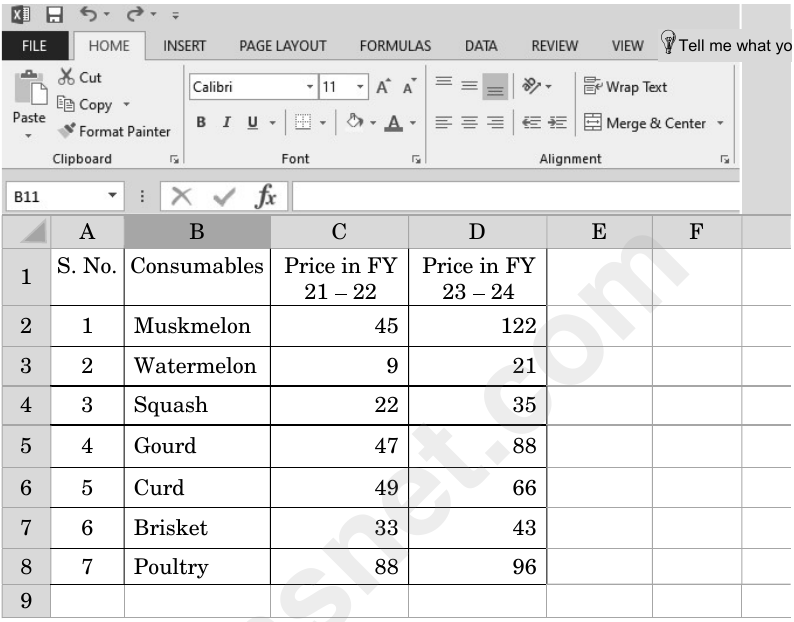
| Formula | Result / Error | Reason |
| (i) =VLOOKUP(B1, B4:D6, 2, 0) | #N/A | The lookup value in B1 ('Consumables') is not present in the first column (B4:B6) of the range. |
| (ii) =SQRT(VLOOKUP(C2, C2:D8, 2, 0) − 100) | No error: 4.69 | VLOOKUP finds 45 in C2 and returns D2 = 122; 122 − 100 = 22 and ≈ 4.69. A #NUM! error would arise only if the value looked up were below 100, giving the square root of a negative number. |
| (iii) =VLOOKUP(B5, B6:D8, 1, 0) | #N/A | B5 ('Gourd') lies above the range; it is not present in B6:B8 (Curd, Brisket, Poultry). |
| (iv) =VLOOKUP(B3, B2:D8, 5, 0) | #REF! | The range B2:D8 has only 3 columns, so column number 5 does not exist in it. |
| (v) =VLOOKUP(B5, B3:D8, 0, 0) | #VALUE! | The column index number is 0; it must be at least 1. |
| (vi) =VLOOKUP(B2, B2:D7, 2, 0)/0 | #DIV/0! | VLOOKUP returns 45 (C2), but the result is divided by zero. |
© examsnet.com
Go to Question: